Ebeveynim

Your mum's phone, as simple as a single button.

No more complicated menus, tiny text or wrong buttons. Your elder just presses the big button and says "call my son"; the call starts by itself.

  • One-touch calling by voice command
  • Voice messages, automatically transcribed
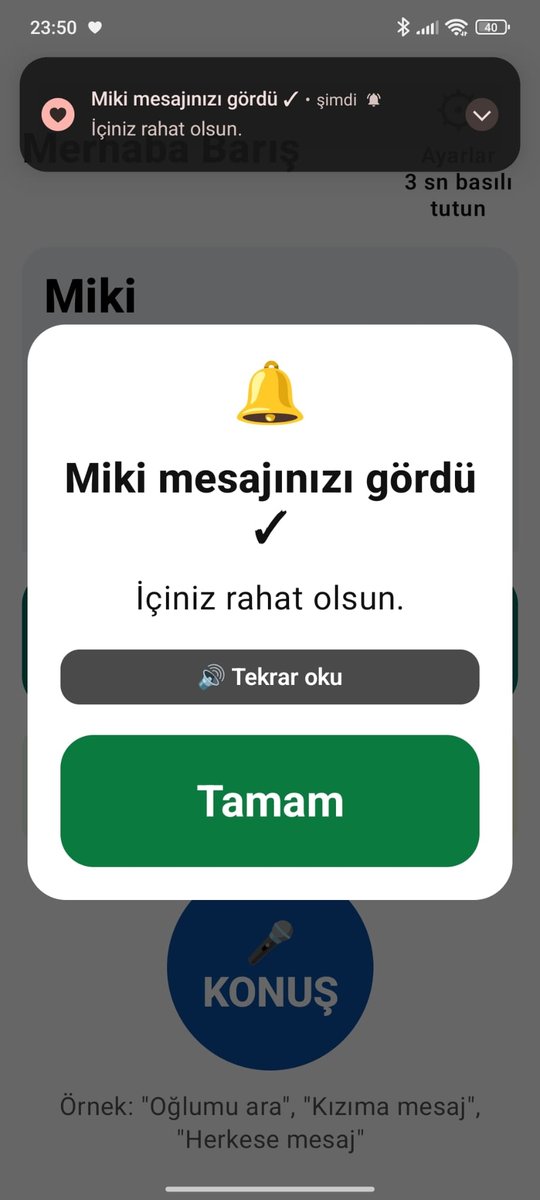
  • "Mum saw your message" notices
  • You get notified when the battery is low or the phone hasn't been used for a long time
  • End-to-end encrypted, no ads
  • Ask "How are you right now?" and get a photo with one tap
  • 10-second video: hear their voice, see their face
  • One subscription covers the whole family: one person buys, everyone uses it
Google Play · AndroidComing soon iPhoneComing soon

All features free for the first 14 days. The subscription belongs to the family; one person buying it is enough.

📖 Step-by-step user guide
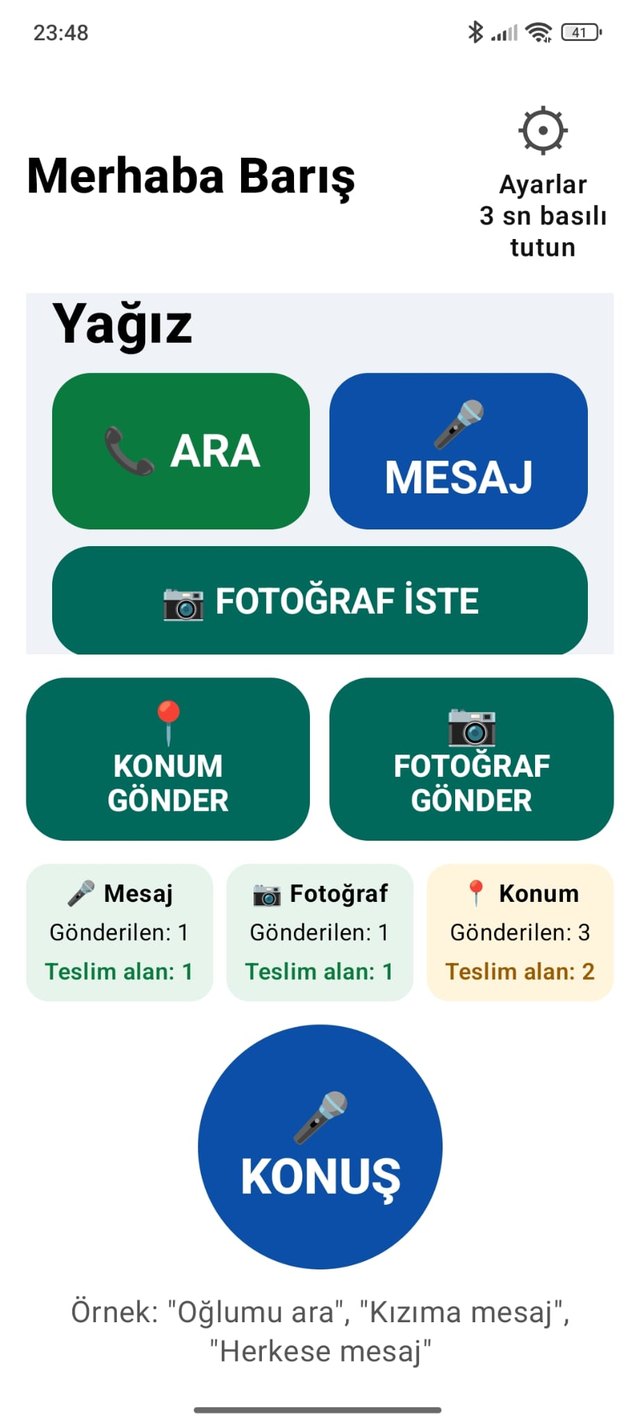
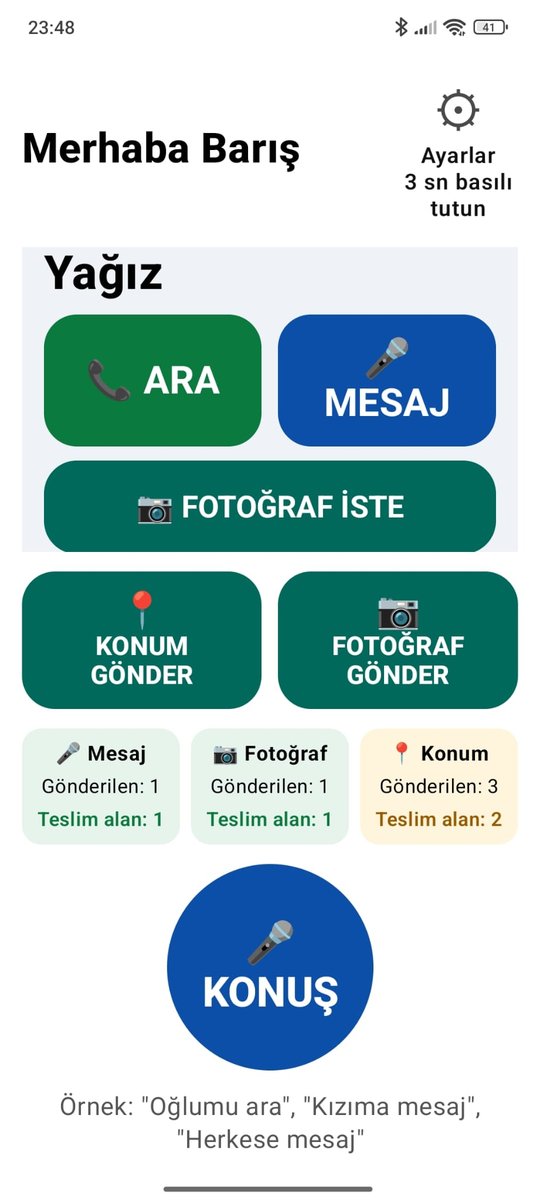
Ebeveynim's big screen: contact card, CALL and MESSAGE buttons, send location and photo, a huge TALK button

For our loved ones, a phone can feel like a wall

Our mums, dads, grandparents… The people who once taught us everything now struggle with tiny text, endless menus and buttons whose purpose is a mystery. Their eyes aren't what they used to be, and their fingers miss the little icons. Even finding our name in the contacts and calling can take minutes; writing a message is often impossible.

And from afar we keep asking the same questions: Is the phone charged? Did they see my message? Why aren't they answering? Did something happen, or is the phone on silent again? If we ask for their location, they don't know how to send it.

Ebeveynim was made for exactly these small but exhausting worries. It turns your elder's phone into one simple, big screen, and gives you clear, reassuring information.

What can you do with Ebeveynim?

  • They can't read small text.

    Huge names, high contrast; everything on screen is read aloud.

  • They can't call from the contacts list.

    Saying "call my son" is enough. Or they press the big CALL button.

  • They can't type messages.

    They just talk; you get the message as audio and as text.

  • They can't read incoming messages.

    Your message appears in huge letters and is read aloud.

  • They don't know how to send their location.

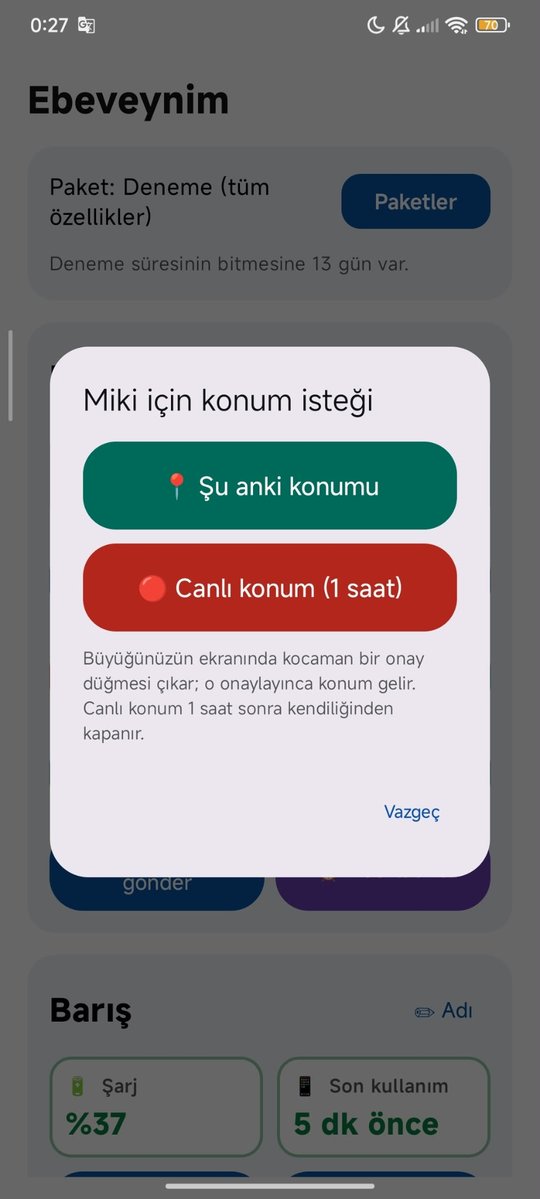
    They say "send my location" or press one button. You can also ask for a one-time or a 1-hour live location; they just approve it, and it opens in Google Maps.

  • You wonder "How are you right now?"

    Tap "Ask photo"; they hold the phone up and press one button, and 3 seconds later the photo is with you. They can also say "send my photo" themselves.

  • They forget to charge the phone.

    You're notified when the battery is low, so you can remind them.

  • You never know if they checked their phone.

    You get a "seen" notice, and an alert if the phone isn't used for a long time.

  • The phone is on silent and they don't call back.

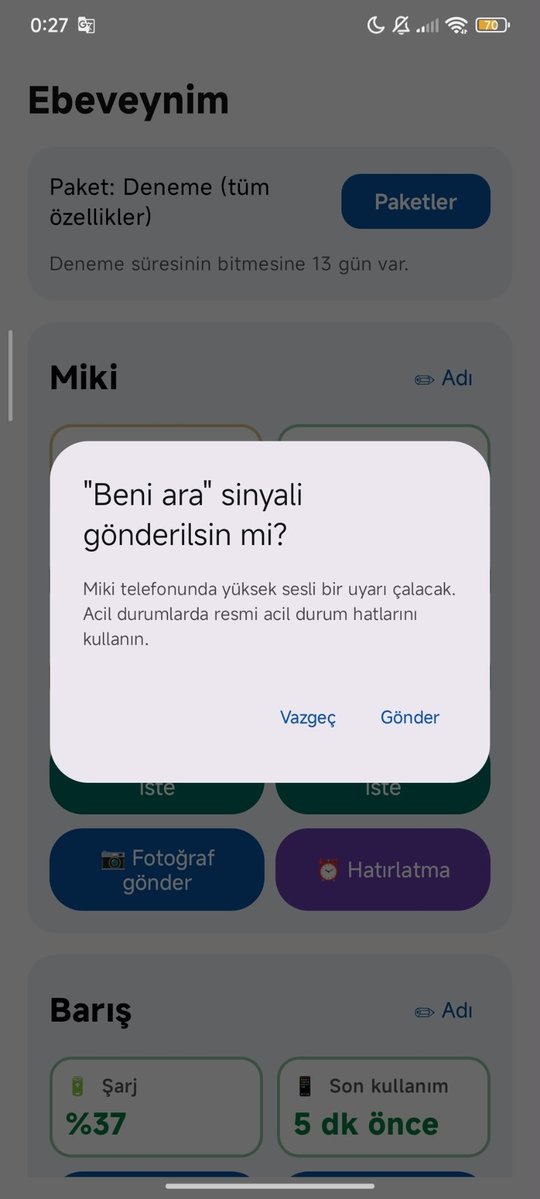
    A "Call me" signal tells them to call you.

  • They call the wrong person by mistake.

    Before every call a huge CANCEL button appears for 3 seconds.

  • Their contacts are a mess.

    You manage their contacts from your own phone, and it updates on their screen instantly.

  • Siblings each try to help separately.

    The whole family comes together in one place; one subscription covers everyone.

  • Hearing their voice isn't enough; you want to see their face.

    Your elder taps the 📹 VIDEO button on your card once, and a 10-second video comes to you. You can send them a 10-second video every day too (Family and Family Plus).

  • The safety of their personal data matters.

    Messages, photos and location are end-to-end encrypted; no one, including us, can see them. Photos aren't stored on the server. No ads.
One app, two screens

You install the same app on your elder's phone and on yours. The answer to "Whose phone is this?" during setup decides what the screen looks like.

Your elder's screen

  • Huge name cards, one-touch calling or messaging
  • Voice commands: "Call my daughter", "Message my son"
  • Incoming messages open the screen like an incoming call
  • 3 seconds to cancel a wrong call
  • High contrast, large text, spoken feedback
  • Send location with one button or by voice
  • Hold up the phone and send a photo with one tap
  • 2x2 buttons on each contact card: CALL, MESSAGE, 📹 VIDEO, 📷 ASK PHOTO
  • Just say "Message everyone", "Message my children" (elders excluded) or "Video to my son"
  • A vibration on every tap; two vibrations when an action is done
  • A spoken and written "Done" after every action

Your screen

  • Manage your elder's contacts remotely
  • Send voice and text messages
  • Read voice messages as transcribed text
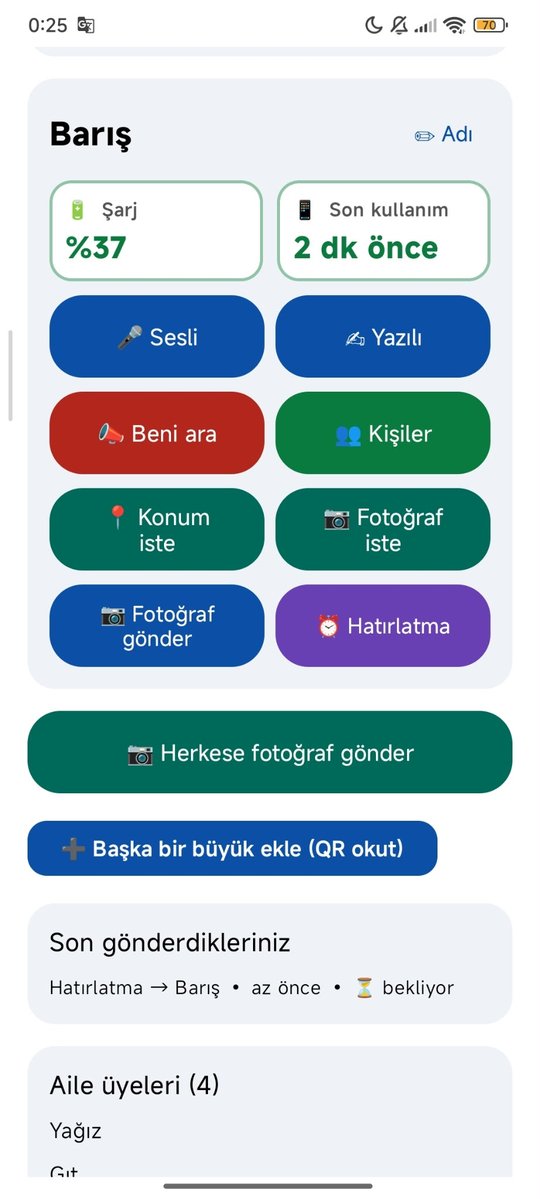
  • "Seen" notices, battery and usage status
  • A "Call me" signal that rings even in silent mode
  • Ask for location and open it in Google Maps
  • Ask for a photo: "How are you right now?"
  • Send your elder a 10-second video (Family and Family Plus)
  • Send a photo to "Everyone" or "Everyone except elders"

Hearing their voice isn't enough. See their face.

Ebeveynim has 10-second videos. Your elder taps the purple 📹 VIDEO button on a contact card once; the phone counts 3-2-1, records for 10 seconds and sends it by itself. Every step is spoken aloud, and at the end it says "Done, your video has been sent".

  • Family planYour elder sends 1 video a day to one person they choose. Each family member can also send the elder 1 video a day.
  • Family PlusYour elder sends 3 videos a day. Each family member can also send 1 video a day to each elder.
  • Stays privateVideos are end-to-end encrypted and deleted from the server once watched. There's no "video to everyone"; each video goes to one person.

Real screenshots from the app

Swipe sideways to browse (screens shown in Turkish).

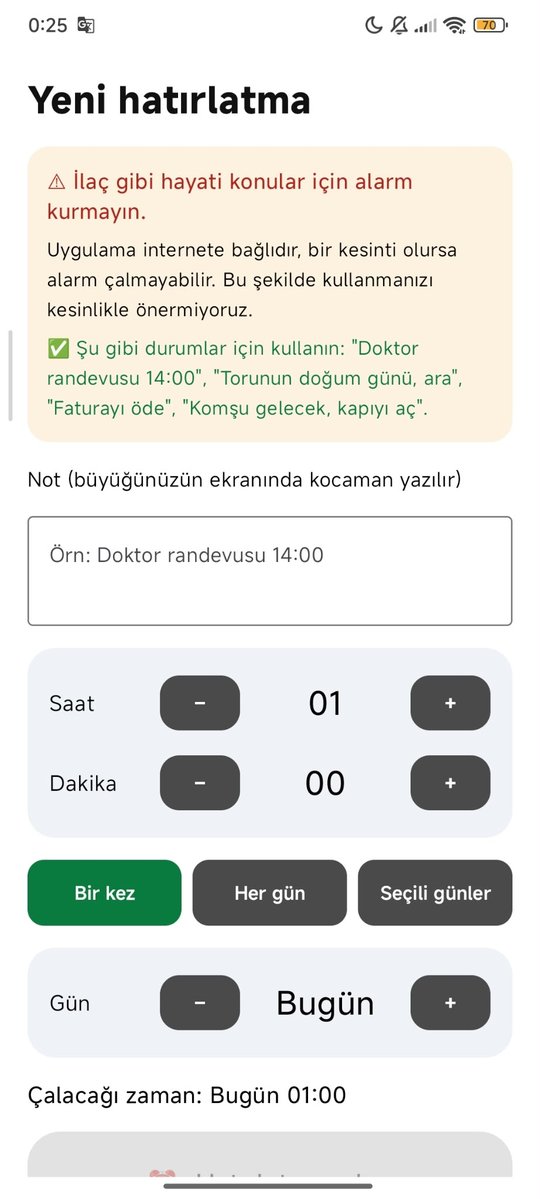
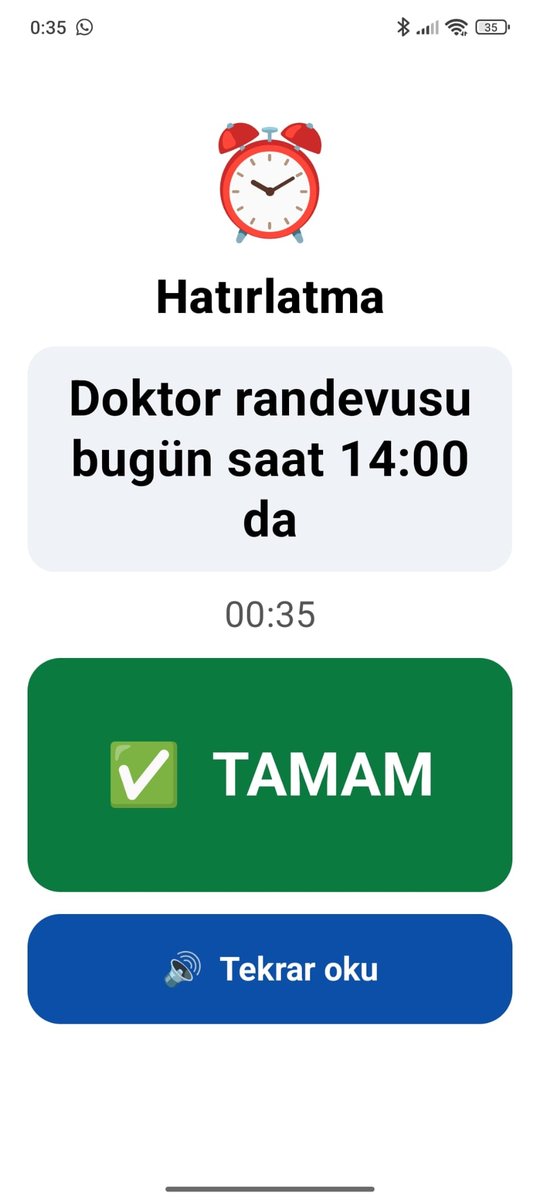
Elder's home screen: contact cards, location and photo buttons, delivery info A reminder ringing: the note in large letters and an OK button Big notice box on the elder's screen: your message was seen Family member's screen: battery, last use and all buttons Location request: current location or 1-hour live location Setting a reminder: note, time and repeat Call me signal confirmation

Setup takes five minutes

  1. Install it on your elder's phone

    Open the app, choose "For my elder", enter their name and phone number and choose a 4-digit PIN. A QR code appears on the screen.

  2. Scan it from your phone

    On your own phone choose "Mine", scan the QR code, then enter your number and choose a 4-digit PIN. Your siblings can join with the same code.

  3. Add contacts

    Pick people from your contacts and give them nicknames like "my son" or "my daughter". Your elder's screen updates instantly.

Peace of mind, even from far away

Ebeveynim lets you know a few simple things about your elder's phone. It doesn't track location in the background and doesn't listen to conversations.

Mum saw your message ✓When your voice or text message is opened
Dad's phone battery is lowWhen the battery drops below 15%
Mum hasn't used her phone for a while6, 12 or 24 hours; you choose
Mum sent a photo 📷The best answer to "How are you right now?"
Dad sent his location 📍When he sends it, or when you ask and he approves; live for 1 hour if you like

Your messages stay within your family

End-to-end encryption

Messages are encrypted on the phone. No one, including us, can read or listen to them.

Join only by QR

You can only join a family by scanning the QR code on the elder's phone. Everyone is notified when someone new joins.

Short-term storage

The content of seen messages is deleted from the server within about an hour. Photos and videos are deleted from the server as soon as they are opened.

One-button deletion

You can permanently delete your account and all your data from within the app.

Plans

Every new family gets all features free for 14 days. Then you pick the plan that suits your family. Payment and cancellation are handled by Google Play or the App Store.

Only one person in the family buys the subscription.
One family member buys the plan with their own Google Play or App Store account, and it instantly applies to the whole family, including your elder. Your elder and the other family members don't pay anything. Only the buyer can change or cancel the plan from their store account. If a second person buys for the same family, two separate subscriptions are created and you are charged twice.

Basic

$2.60 / month

  • 1 family member
  • Voice-command calling
  • Voice and text messages
  • Send and ask for location (current or 1-hour live)
  • Send and ask for photos
  • Reminder alarms
  • No video

Family

$6.50 / month

  • Up to 3 family members
  • "Seen" notices
  • Battery and usage alerts
  • "Call me" signal
  • 📹 Elder sends 1 video a day; each family member 1 a day to the elder (10 s)
  • Everything in Basic

Family Plus

$13.00 / month

  • Up to 5 family members
  • Up to 4 elders: mum and dad on separate phones can call and message each other
  • Whole family alerted about unseen messages
  • 📹 Elder sends 3 videos a day; each family member 1 a day to each elder
  • Everything in Family

Try it free for 14 days, with every feature.

What you can do, and the limits

FeatureBasicFamilyFamily Plus
Family members / elders1 / 13 / 15 / 4
Voice and text messagesYesYesYes
Video from elder (10 s)No1 a day, to one person3 a day
Video from family member (10 s)No1 a day to the elder1 a day to each elder
Photo requestsElder 10 a day; family member 3 a day per elder
LocationCurrent or 1-hour live, once the elder approves
"Seen" notices, battery and usage alerts, "Call me"NoYesYes
Reminder alarmsUp to 10 per elder
General limitUp to 60 messages/requests an hour. While a location, photo request or "Call me" is unanswered, a new one can't be sent for 30 minutes.

During the trial everything in Family Plus is on. If your elder says "Message everyone", it goes to everyone including other elders; "Message my children" goes to family members only.

The store shows the price in your local currency. When the trial ends, you need a plan to keep using the app.

Frequently asked questions

For setup, changing phones, PINs and everything else: 📖 Step-by-step user guide

Who buys the subscription? Does each family member pay?

No. The subscription belongs to the family, not to a person. Only one family member buys it; your elder and all family members share the same plan. Changes and cancellation are made from the buyer's store account. If the family already has a plan, the app hides the buy buttons and says "Your family's plan is active". The whole family is notified when a plan is bought. If two people bought one by mistake anyway, the later buyer should cancel in their store and ask the store for a refund.

How does video work, and who can see it?

Videos are up to 10 seconds and go only to the chosen person. They're end-to-end encrypted, so no one, including us, can watch them. Once opened, they're deleted from the server and stay only on the recipient's phone (the last 5 from each person). On the Family plan the elder sends 1 video a day, on Family Plus 3 a day; on both plans each family member can also send 1 video a day to each elder. The Basic plan has no video.

Is Ebeveynim an emergency app?

No. Ebeveynim is not an emergency line; it's a calling and messaging app designed for families. Messages and notifications can be delayed by internet or phone problems. In an emergency, always use the official emergency numbers.

Can I see my elder's location?

Yes, with their approval. Your elder can press "Send my location" or say it. You can also tap "Ask location" to request the current location or a 1-hour live location; a big confirmation button appears on your elder's screen, and when they press it the location comes to you and opens in Google Maps. Live location turns off by itself after 1 hour, and your elder can stop it at any time. The app never tracks location secretly; location is always sent encrypted.

My elder has an iPhone. Can we use it?

Yes. The iPhone version is coming and works together with Android: your elder can use Android and you an iPhone, or the other way round. Because of Apple's rules, on iPhone the message screen doesn't open by itself on the lock screen; it arrives as a notification, and "last used" means the last time the app was opened.

What happens if I delete the app or change my phone?

Nothing is lost. When you reinstall the app on the same phone, it signs you back in automatically. On a new phone, choose "I already have an account" and enter the phone number and 4-digit PIN you used when you signed up; your family, contacts and plan come back exactly as they were, and nobody needs to scan a QR code again. The same applies to your elder's phone. If you changed phones, delete the app from the old one.

What if I forget my PIN?

For security, PINs can't be reset by SMS or email. If you're a family member, you can rejoin by scanning the QR code on your elder's phone again. If the elder's PIN is forgotten, the elder's phone has to be set up again and the family re-created, so we recommend writing the elder's PIN down during setup.

Do voice commands work on every phone?

They use the phone's speech recognition service and work on most phones that support English or Turkish. Transcribing voice messages requires Android 13 or later; on older phones messages are sent as audio only.

How do I cancel my subscription?

On Android go to Google Play → Payments & subscriptions, on iPhone go to Settings → [your name] → Subscriptions, and cancel at any time. The subscription continues until the end of the period.

How do I delete my data?

Use the "Delete my account and data" button in the app. Details are on the account deletion page.

Important: Don't share confidential information such as bank details, passwords or ID numbers in this app.
Ebeveynim — Your loved ones, always close

Simple for your elders, peace of mind for your family.

Google Play · AndroidComing soon iPhoneComing soon